Brain food for publishers and followers.
New: AI Processing for Your Feeds
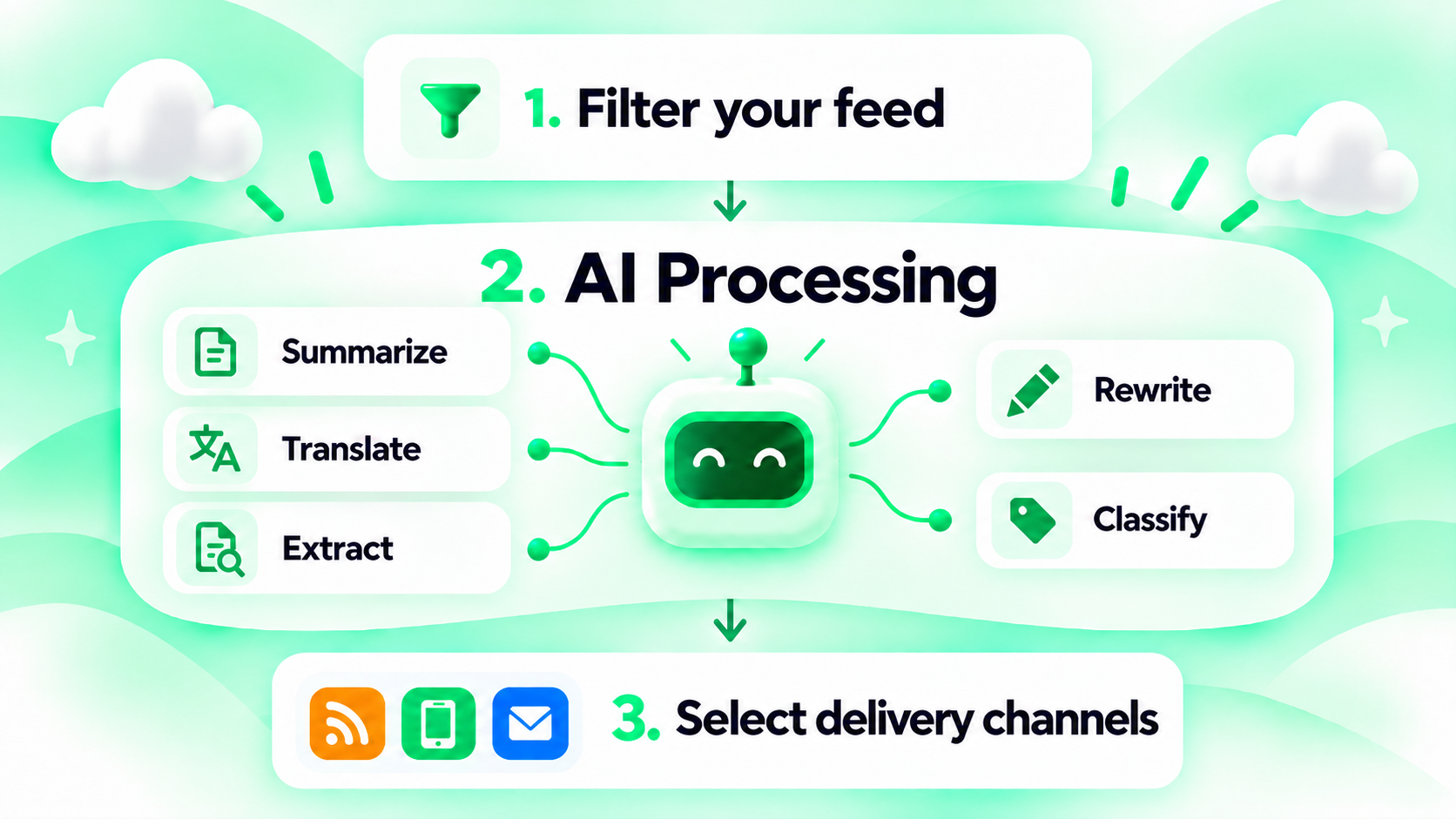
You can now use AI to automatically summarize, translate, extract information from, rewrite, or classify stories!
Until now, following a feed involved two steps:
- Apply a filter (optional), such as an AI filter.
- Select a delivery channel (email, mobile app, My News, etc.).
We’ve now added a new step in between: AI Processing. It lets you transform the content before it’s delivered to you. So the setup now has three steps: 1. Filter (optional), 2. AI Processing (optional), 3. Delivery channel.
Here’s what you can do with it:
A) Summarize: Get to the Point
Don’t have time to read lengthy articles? AI can summarize them for you.
Choose between three summary lengths:
- Brief: 1–2 sentences
- Standard: 4–6 sentences
- Detailed: 2–3 short paragraphs
You can also choose to include the original content below each summary.
B) Translate: Break Language Barriers

Want to follow news from other countries but don’t speak the language? AI can now automatically translate incoming stories into your preferred language.
For example, keep track of what international competitors are announcing on their local websites, even if they don’t publish in English.
C) Extract Information: Get Exactly What You Need

Why read an entire article when you’re only interested in a few details?
Tell the AI which details you want, and it will pull out exactly those.
For example:
- Job listings: Extract job titles, salaries, and locations.
- Product announcements: Extract product names, prices, and release dates.
- Events: Extract dates, venues, and speakers.
- Financial news: Extract companies, revenue figures, and growth rates.
You can define your own fields, and the AI will organize the results accordingly.
D) Rewrite: Make Content Work for You

Too technical? Too complicated? Too formal?
Have AI rewrite incoming stories in your preferred style.
Choose between:
- Simpler: Make complex content easier to understand.
- More professional: Use a more formal tone.
- More casual: Make the text more conversational.
- Custom: Define your own writing style.
For example, follow technical software documentation updates and have AI explain the changes in plain English.
E) Classify: Let AI Sort Things Out

Following news on many different topics? AI can automatically sort incoming stories into categories for you.
Define your own categories, and the AI will assign each story to the ones that fit. Stories can be assigned to multiple categories when relevant.
For example, follow cybersecurity news and classify incoming reports as Data Breaches, Malware, Vulnerabilities, or Regulatory Changes.
How to Get Started
To set it up:
- Find a feed you want to follow and open its configuration page. This also works for feeds you already follow.
- Scroll down to the AI Processing section (step 2).
- Select an AI processing option and configure it.
- Save your settings.
From then on, new stories are processed automatically before they reach you.
For now, you can select one AI processing option per feed. We’re also looking into allowing multiple processing steps, such as translating a story and then summarizing it.
The number of stories AI can process per 30 days depends on your plan. See Features and Pricing for details.
Want AI Processing without a monthly fee? Grab our lifetime deal on AppSumo: pay once and enjoy lifetime access to our premium reader features, including AI Processing.
Have questions or ideas for improvements? We’d love to hear from you!