How to Enable API Publishing
For a feed you already have, go to My Offered Feeds, click the email icon next to the feed, open the Sources tab, and activate the API option at the bottom.
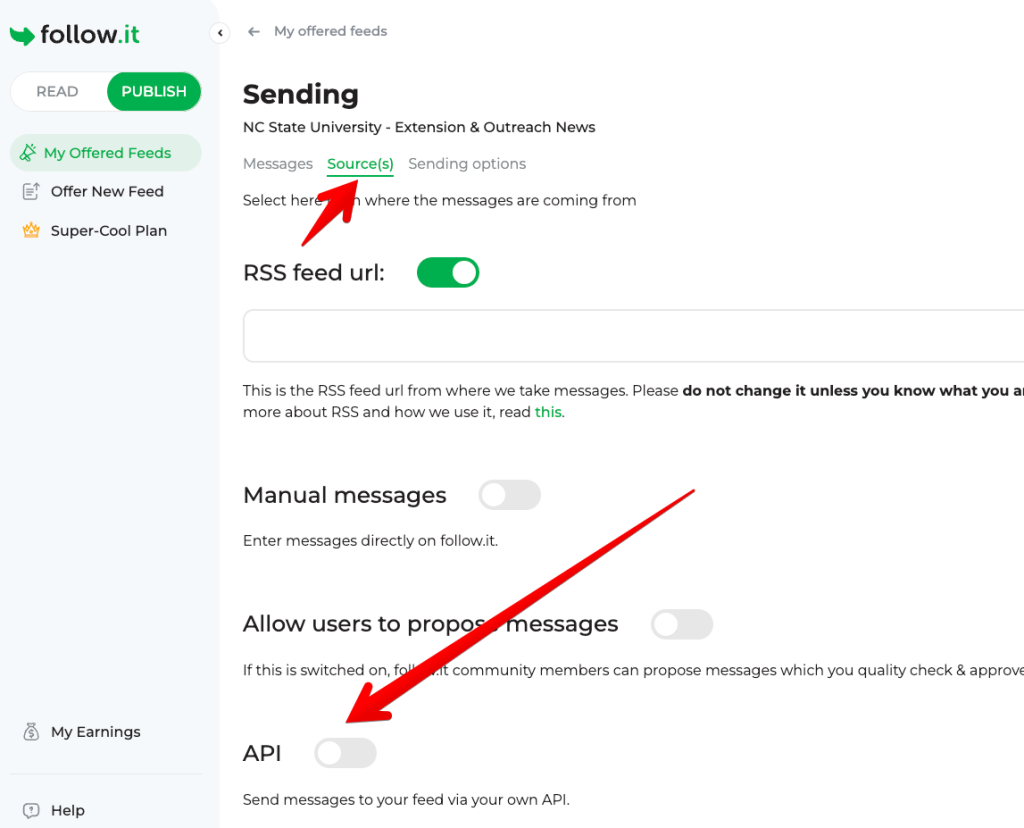
For a new feed, simply go through the regular feed setup process and select Via an API on the first page.
Use follow.it as Your Personal Delivery Hub
For publishers, the use case is straightforward: anything you want your followers to know about can now be sent to your feed via API.
But there’s another use case: sending updates to yourself.
follow.it supports multiple delivery channels, including email, RSS, Telegram, Discord, and more. Instead of building separate integrations for each channel, you can send updates from your own system to a follow.it feed and then choose how you want to receive them.
Available for Free
API publishing may sound like a premium feature, but we’ve made it available for free.
Our goal is simple: we want people to get as much value as possible from follow.it and, hopefully, spread the word.
Speaking of which: our lifetime deal for readers is currently live on AppSumo. It’s a one-time offer and won’t return once the campaign ends.
Have questions or ideas for improvements? We’d love to hear from you!